Developer’s Practical Guide to Scaling Web Applications from 100 to 10 Million Users
If you’ve been following my journey as a developer based in Mohali, Punjab, you know I started out building standard full-stack web applications using the MERN stack. When you are building a product for a local business, a startup MVP, or a personal portfolio, scaling isn’t really on your mind. You build a clean UI, set up an Express API server, connect it to a database, and deploy it to a single server instance. It’s fast, it works, and you’re happy.0
But what happens when your product goes viral?
What happens when your user base jumps from 100 people a day to 10,000, then 100,000, and eventually 10 million daily active users?
If you try to run that kind of traffic on your standard MVP architecture, your application will crash within seconds. Your database will lock up, your server will throw 504 Gateway Timeouts, and your users will abandon your product.
Scaling an application isn’t just about buying a larger server. It is a systematic process of identifying bottlenecks, decoupling components, and redesigning how data flows through your system.
In this deep dive, we are going to walk through the complete lifecycle of scaling a web application. We’ll look at the step-by-step architectural evolution, the critical bottlenecks you will face, and the real-world trade-offs you must navigate to build a highly available, fault-tolerant system.
1. Stage 1: The Monolithic Setup (Day 1)
Every application starts as a monolith. In a MERN stack context, this means your React frontend, Express backend, and MongoDB database all run on the same virtual machine (e.g., an AWS EC2 instance or a DigitalOcean Droplet).
   ┌────────────────────────────────────────┐
   │             Single Server              │
   │                                        │
   │  ┌──────────┐  ┌──────────┐  ┌───────┐ │
   │  │  React   │  │ Express  │  │ Mongo │ │
   │  │ Frontend │─>│  Server  │─>│  DB   │ │
   │  └──────────┘  └──────────┘  └───────┘ │
   └────────────────────────────────────────┘
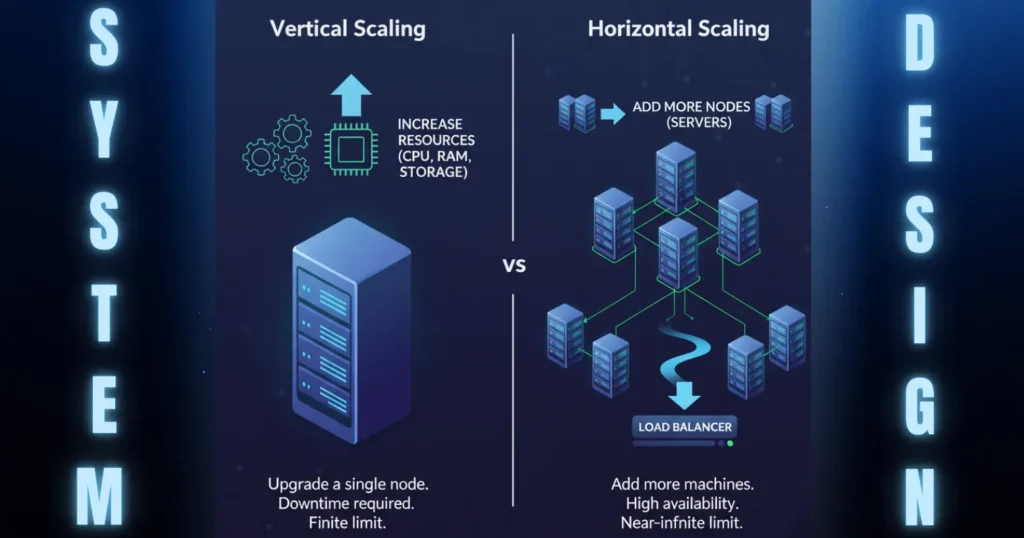
At this stage, you scale Vertically (Scaling Up). If the server runs out of memory, you upgrade the server to a larger tier with more CPU cores and RAM.
The Limits of Vertical Scaling:
- The Cost Curve: Doubling your server specs doesn’t double the cost; the pricing curve for high-end server instances grows exponentially.
- The Physical Ceiling: You cannot buy infinite hardware. Eventually, you hit a hard hardware limit.
- Single Point of Failure (SPOF): If your single server experiences a hardware fault, a network drop, or a database crash, your entire business goes offline.
2. Stage 2: Decoupling the Database (Day 10)
The first real scaling step is to separate your compute layer (application server) from your state layer (database).
  ┌──────────┐        ┌────────────────┐        ┌────────────────┐
  │  Client  │───────>│   App Server   │───────>│   Database     │
  │ (React)  │        │ (Express/Node) │        │   (MongoDB)    │
  └──────────┘        └────────────────┘        └────────────────┘
Why this is a crucial step:
- Resource Optimization: Database engines require fast disk read/write speeds (I/O) and high memory (RAM) to cache indexes. Application servers require high CPU to process business logic. By separating them, you can host them on specialized hardware configurations.
- Failure Isolation: If your Express server crashes due to an unhandled memory leak in your code, your database remains safely online and uncorrupted.
3. Stage 3: Horizontal Scaling & Load Balancing (Day 100)
When a single application server can no longer handle the volume of concurrent HTTP requests, you must shift from Vertical Scaling to Horizontal Scaling (Scaling Out).
Instead of running one giant server, you run multiple identical, lightweight application servers behind a Load Balancer.
                         ┌──────────────┐
                         │   Load       │
                         │   Balancer   │
                         │   (Nginx)    │
                         └──────┬───────┘
                                │
        ┌───────────────────────┼───────────────────────┐
        ▼                       ▼                       ▼
┌───────────────┐       ┌───────────────┐       ┌───────────────┐
│ App Server 1  │       │ App Server 2  │       │ App Server 3  │
└───────┬───────┘       └───────┬───────┘       └───────┬───────┘
        │                       │                       │
        └───────────────────────┼───────────────────────┘
                                ▼
                        ┌───────────────┐
                        │   Database    │
                        └───────────────┘
The Load Balancer (like NGINX, HAProxy, or AWS Application Load Balancer) acts as a traffic controller, distributing incoming user requests across your pool of application servers using algorithms like Round Robin or Least Connections.
The Golden Rule: Stateless Applications
To scale horizontally, your application servers must be completely stateless.
If a user logs in and Server 1 saves their session data directly in its local RAM, a subsequent request routed to Server 2 will fail because Server 2 has no record of that session. The user is logged out.
To make your application stateless:
- Move Sessions to Cache: Store session tokens and user state in a fast, in-memory database like Redis that all application servers can access.
- Decouple File Uploads: Never store user uploads (like profile pictures) on the local disk of an application server. If that server is destroyed or auto-scaled down, the files are lost. Instead, upload assets directly to an Object Storage service like AWS S3 or Google Cloud Storage, and serve them via a CDN (Content Delivery Network).
4. Stage 4: Solving the Database Bottleneck (Day 500)
Now that your application servers are stateless and scaled horizontally, the bottleneck shifts to your database. Every write, update, and read query from all your app servers converges on a single database instance.
To scale your data tier, follow this operational sequence:
                  DATABASE PERFORMANCE OPTIMIZATION
                                  │
         ┌────────────────────────┼────────────────────────┐
         ▼                        ▼                        ▼
   CACHE READS               READ REPLICAS            DB SHARDING
   (Redis Caching)           (Primary-Replica)        (Split Writes)
   - Store hot queries       - Replicas handle reads  - Partition tables
   - Save DB load            - Primary handles writes - Infinite scale
Step A: Implement Caching (Redis)
Most web applications are read-heavy (e.g., users read articles, view profiles, or search products far more often than they create new data).
Instead of forcing your database to execute the same slow SQL or NoSQL query repeatedly, cache the query result in Redis. When a request comes in, check the cache first. If it’s a hit, return the data in milliseconds. If it’s a miss, query the database, write the result to the cache for the next user, and return it.
Step B: Database Replication (Primary-Replica Pattern)
If your read traffic still overwhelms your database, set up Read Replicas.
- Primary Node: Handles all write queries (INSERT, UPDATE, DELETE).
- Replica Nodes: Mirror the primary database asynchronously and handle all read queries (SELECT).
If read traffic spikes, you simply spin up more replica nodes to distribute the load.
Step C: Database Sharding (Horizontal Partitioning)
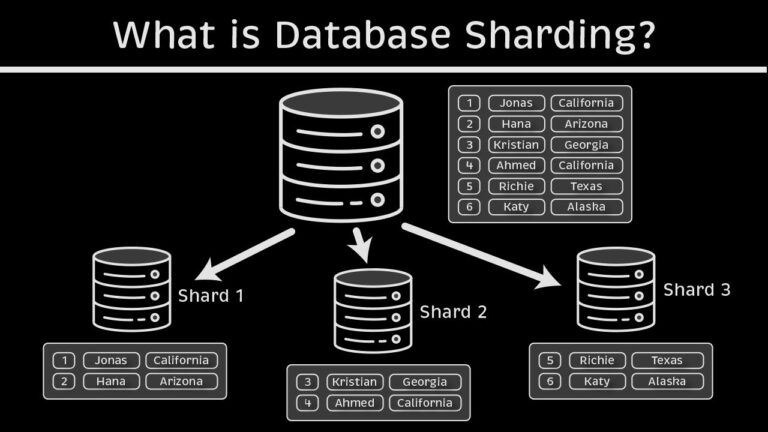
If your write traffic overflows the primary database instance, replication won’t help. You must implement Sharding—breaking up a single table across multiple physical database instances based on a Shard Key (like user_id or country_code).
For example, Shard A stores users from ID 1 to 5,000,000, while Shard B stores users from 5,000,001 to 10,000,000. This distributes the write load across separate hardware.
5. Stage 5: Going Distributed (Day 1,000)
At massive scale (10 million+ users), a monolithic backend architecture becomes difficult to manage, deploy, and scale. We must move to a Distributed Systems Architecture.
                        ┌───────────────┐
                        │  API Gateway  │
                        └───────┬───────┘
                                │
        ┌───────────────────────┼───────────────────────┐
        ▼                       ▼                       ▼
┌───────────────┐       ┌───────────────┐       ┌───────────────┐
│ Auth Service  │       │ Order Service │       │ Notification  │
└───────────────┘       └───────┬───────┘       └───────┬───────┘
                                │                       ▲
                                ▼                       │
                        ┌───────────────┐               │
                        │ Message Queue │───────────────┘
                        │    (Kafka)    │  Asynchronous
                        └───────────────┘  Processing
1. Microservices
We break our single codebase down into small, decoupled services based on business domains (e.g., Auth Service, Payment Service, Inventory Service). Each service runs on its own infrastructure, has its own database, and communicates via lightweight APIs (REST or gRPC).
If your Payment Service needs high computing power, you scale it up without wasting resources on the Notification Service.
2. Asynchronous Processing (Message Queues)
In a scaled application, you cannot handle every task synchronously. If a user places an order, don’t make them wait while your server generates a PDF, sends an email, calls the shipping API, and updates the dashboard.
Instead, use a Message Queue (like RabbitMQ, Apache Kafka, or Amazon SQS):
- The application server saves the order to the database.
- It pushes an “Order Placed” message onto the queue.
- The server immediately returns a success message to the user.
- Independent background workers consume messages from the queue and process the tasks (emails, PDFs, shipping) asynchronously.
6. The Core Principles of Scaling
To make logical decisions while scaling, you must understand three foundational system design concepts:
1. The CAP Theorem
In a distributed database system, you can only guarantee two out of the three following properties:
- Consistency (C): Every read returns the most recent write.
- Availability (A): Every request receives a non-error response, even if it is stale.
- Partition Tolerance (P): The system continues to operate despite network drops between nodes.
Because network failures are inevitable in physical systems, you must choose Partition Tolerance (P) and then decide whether your application prioritizes Consistency (CP) or Availability (AP).
2. CDN & Edge Computing
Keep static assets (images, CSS, JS files, video segments) as close to your users as possible. Use a Content Delivery Network (CDN) like Cloudflare or CloudFront.
When a user in New Delhi requests an image, the CDN serves it from a local edge cache in India, preventing the request from traveling to your primary origin server in the US.
3. Graceful Degradation & Circuit Breakers
At scale, components will fail. You must design your system to degrade gracefully.
Use the Circuit Breaker Pattern in your microservices: if your recommendation engine API goes offline, the frontend shouldn’t crash. The circuit breaker trips, and the application simply displays a list of default popular items instead of personalized recommendations.
Conclusion: Scale Only When You Need To
The most common mistake developers make is Premature Optimization.
Building a highly distributed microservices architecture with sharded databases and Kafka queues on Day 1 will slow down your development speed, introduce massive debugging complexity, and drain your budget.
Start with a clean, modular monolith. Build simple code, write efficient database indexes, and use caching. As your traffic spikes, follow the systematic scaling steps we’ve outlined. The goal is to design your application so that you can scale each component independently when the need arises.
Are you working on an application that is starting to hit performance bottlenecks? What strategies are you planning to deploy first? Let me know in the comments below!

25 year old AI & MERN Stack Developer based in Mohali, Punjab, India, with a strong interest in system design, Artificial Intelligence, Large Language Models (LLMs), and scalable software architecture. Passionate about building innovative, intelligent, and high-performance applications.