Scaling the Stack: A MERN Developer’s 2,000-Word Guide to System Design
When you start out as a web developer building MERN stack apps, your world is relatively simple. You write some React code, spin up an Express server, hook it up to a MongoDB instance, and deploy it to a single cloud VPS. As long as you have a few dozen concurrent users, everything runs fast.
But as my focus has shifted from building local web apps here in Mohali to exploring large-scale infrastructure and Agentic AI systems, I’ve realized that coding the application logic is only half the battle. The real challenge starts when your traffic spikes from 100 users a day to 10 million daily active users (DAUs).
If you try to run 10 million users on a standard monolithic MERN server, your database will lock up, your Node.js single-threaded event loop will choke, and your frontend will throw 504 Gateway Timeouts.
In this deep dive, we’re going to step out of the browser and look at the big picture. We’ll map out how to scale a typical web application from Day 1 to Day 1,000, shifting from a simple monolith to a highly available, distributed system.
1. The Starting Point: Day 1 (The Single Monolithic Server)
Every project starts somewhere. On Day 1, your entire setup usually lives on a single virtual machine (like an AWS EC2 instance or a DigitalOcean Droplet).
   ┌────────────────────────────────────────┐
   │            Virtual Machine             │
   │                                        │
   │  ┌──────────┐  ┌──────────┐  ┌───────┐ │
   │  │  Client  │  │ Express  │  │ Mongo │ │
   │  │ (React)  │─>│  Server  │─>│  DB   │ │
   │  └──────────┘  └──────────┘  └───────┘ │
   └────────────────────────────────────────┘
In this setup, your Express server routes API requests, reads and writes to MongoDB, serves the static HTML/CSS/JS frontend assets, and manages local sessions.
Why it works initially:
- Zero Latency: Database queries are incredibly fast because the database process runs on the same physical loopback interface (
localhost) as the backend code. - Easy Deployments: You just SSH into the server, git pull your code, run
npm install, and start the process using a manager likepm2.
The Limits of Vertical Scaling (Scaling Up)
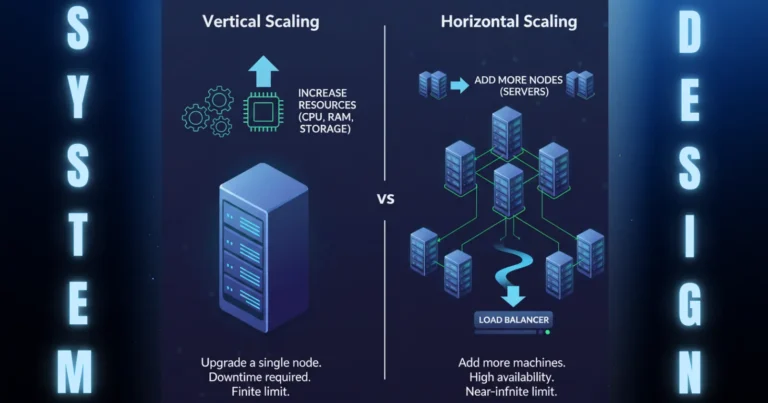
As soon as traffic ticks up, your CPU usage spikes. The obvious first response is Vertical Scaling—buying a larger virtual machine with more RAM and CPU cores.
But vertical scaling has two massive flaws:
- The Hard Hardware Ceiling: You cannot buy infinite hardware. Eventually, you hit the maximum physical limits of a single machine.
- Single Point of Failure (SPOF): If your single server experiences a hardware failure, operating system crash, or network outage, your entire application goes offline instantly. There is zero redundancy.
2. Decoupling the Tiers: Day 10 (Separating Application and Database)
The first rule of system design is to separate concerns. To scale past a single server, you must separate your compute layer (Express application server) from your data layer (MongoDB database).
  ┌──────────┐        ┌────────────────┐        ┌────────────────┐
  │  Client  │───────>│   App Server   │───────>│   Database     │
  │ (React)  │        │ (Express/Node) │        │   (MongoDB)    │
  └──────────┘        └────────────────┘        └────────────────┘
Now, your compute server and database server live on completely separate hardware.
Why this is a crucial step:
- Resource Optimization: Database operations are heavily memory and disk I/O intensive. Application code is generally CPU-bound. Splitting them allows you to choose optimized hardware for each task (e.g., an SSD-optimized, high-RAM instance for your database, and a high-compute instance for Express).
- Independent Scalability: You can now tweak and reboot your application server without corrupting or restarting your database.
3. Handling Growth: Day 100 (Horizontal Scaling and Load Balancers)
As your user base in Punjab and across India begins to grow, a single application server is no longer enough to handle incoming HTTP connections. We need to transition from Vertical Scaling (scaling up) to Horizontal Scaling (scaling out).
Instead of running one giant server, we run multiple identical, lightweight application servers. But how do we decide which server handles which request? Enter the Load Balancer.
                         ┌──────────────┐
                         │   Load       │
                         │   Balancer   │
                         │   (Nginx)    │
                         └──────┬───────┘
                                │
        ┌───────────────────────┼───────────────────────┐
        ▼                       ▼                       ▼
┌───────────────┐       ┌───────────────┐       ┌───────────────┐
│ App Server 1  │       │ App Server 2  │       │ App Server 3  │
└───────┬───────┘       └───────┬───────┘       └───────┬───────┘
        │                       │                       │
        └───────────────────────┼───────────────────────┘
                                ▼
                        ┌───────────────┐
                        │   Database    │
                        └───────────────┘
A load balancer (like NGINX, HAProxy, or AWS ALB) acts as a traffic cop. It sits between the internet and your servers, accepting incoming requests and routing them to the healthiest backend application server based on algorithms like Round Robin or Least Connections.
The Stateless Application Rule
The moment you introduce a load balancer, your application servers must become stateless.
In a single-server setup, you might store user session data directly in the application server’s local RAM. If Server 1 holds the session for User A, and the load balancer suddenly routes User A’s next request to Server 2, Server 2 won’t recognize them. The user gets logged out randomly.
To solve this, we extract state entirely from our application servers:
- Session Storage: We store session tokens or active user states in a fast, in-memory key-value store like Redis. All application servers query the same Redis cluster to authenticate requests.
- Local Files: Never store uploaded files (like profile photos) on the application server’s local storage. If that server gets replaced or auto-scaled down, the files are deleted. Instead, save them to a shared object storage service (like AWS S3 or Google Cloud Storage).
4. Resolving the Database Bottleneck: Day 500 (Read/Write Splits and Caching)
With multiple stateless application servers running, your compute layer is now highly scalable. But all of these servers are talking to a single database. Soon, your database CPU hits 95%. Reads and writes slow down to a crawl.
In system design, database optimization follows a strict hierarchy of operations: Cache first, Optimize queries second, Scale database hardware third.
Step 1: Introduce Cache (Redis)
Most web applications are read-heavy (e.g., 90% of requests are reading articles, profiles, or product feeds, while only 10% are writing new data).
Instead of forcing MongoDB or PostgreSQL to run the same search query thousands of times per minute, we cache the query result in Redis.
                     ┌───────────────┐
                     │  User Query   │
                     └───────┬───────┘
                             │
                             ▼
                    /─────────────────\
                   <   Is in Cache?    >
                    \─────────────────/
                       /           \
                Yes   /             \  No
                     ▼               ▼
             ┌───────────────┐   ┌───────────────┐
             │ Return cached │   │ Query primary │
             │     data      │   │   Database    │
             └───────────────┘   └───────┬───────┘
                                         │
                                         ▼
                                 ┌───────────────┐
                                 │ Write to Cache│
                                 │   for next    │
                                 │    request    │
                                 └───────────────┘
- Cache Hit: The data is in Redis. It is returned to the user in under 2 milliseconds.
- Cache Miss: The data is missing. The app server queries MongoDB, saves a copy of the result in Redis with a Time-To-Live (TTL) expiration, and returns the result.
Step 2: Database Replication (Primary-Replica Pattern)
If caching isn’t enough, we must scale the database itself. The most common pattern for scaling databases is Primary-Replica Replication.
                        ┌──────────────┐
                        │ App Servers  │
                        └─┬──────────┬─┘
                          │ Writes   │ Reads
                          ▼          ▼
                   ┌──────────┐  ┌──────────┐
                   │ Primary  │  │ Replica  │
                   │ Database │  │ Database │
                   └────┬─────┘  └──────────┘
                        │ Sync
                        ▼
                   ┌──────────┐
                   │ Replica  │
                   │ Database │
                   └──────────┘
- Primary Node: Handles all write queries (inserts, updates, deletes).
- Replica Nodes: Mirror the primary database continuously via sync pipelines. These handle all read queries.
If your read traffic spikes, you simply spin up more Replica Nodes. If the Primary Node goes offline, one of the replicas is automatically promoted to Primary, preventing systemic downtime.
5. Reaching 10 Million Users: Day 1,000 (Microservices, Queues, and Sharding)
When you hit true massive scale (10 million+ users), even replica databases and caching layers begin to struggle. At this stage, you must transition your architecture to a fully distributed system.
Transitioning to Microservices
A monolith is a single codebase containing all features (authentication, payment, shipping, search, reviews). At scale, different parts of your application will have wildly different scaling needs.
We break the monolith down into small, single-purpose services (Microservices) that communicate over lightweight protocols (gRPC or REST APIs).
                      ┌───────────────┐
                      │ API Gateway   │
                      └───────┬───────┘
                              │
        ┌─────────────────────┼─────────────────────┐
        ▼                     ▼                     ▼
┌───────────────┐     ┌───────────────┐     ┌───────────────┐
│ Auth Service  │     │ Order Service │     │ Payment Serv. │
└───────────────┘     └───────────────┘     └───────────────┘
For instance, your payment processor might require high security and transaction safety, while your product search service needs high-speed indexing. Splitting them allows you to scale them independently.
Asynchronous Communication with Message Queues
In a monolithic setup, when a user purchases an item, the application handles it synchronously:
- Charge the credit card (wait 2 seconds).
- Generate an invoice PDF (wait 1 second).
- Send an email confirmation (wait 1 second).
- Update the inventory dashboard (wait 1 second).
The user is stuck staring at a loading spinner for 5 seconds. If any of those external APIs fail, the entire transaction crashes.
To solve this, we use Message Queues (like RabbitMQ, Apache Kafka, or Amazon SQS) to handle tasks asynchronously.
┌───────────────┐   Publish    ┌───────────────┐   Consume   ┌───────────────┐
│ Order Service │─────────────>│ Message Queue │────────────>│ Email Service │
│ (Saves Order) │   Message    │   (Kafka)     │   Worker    │ (Sends Email) │
└───────────────┘              └───────────────┘             └───────────────┘
The moment the user hits “buy,” the Order Service saves the order details to the database and immediately pushes a job message onto the queue. It then returns a “Success” message to the user in 50 milliseconds.
Meanwhile, background worker instances read from the queue and handle the heavy lifting (generating PDFs, sending emails, contacting payment processors) in the background. If the email API crashes, the message remains safely in the queue to be retried later, preventing data loss.
Database Sharding (Horizontal Partitioning)
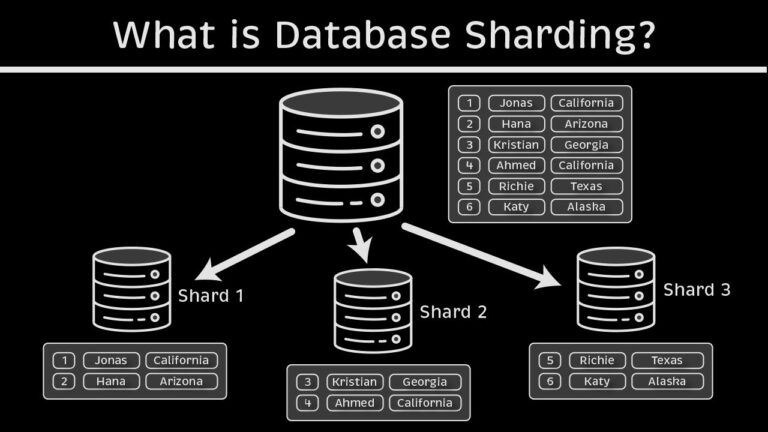
If your primary write database starts running out of space or performance degrades under write loads, replica nodes won’t help (since they only scale reads). You must implement Sharding.
Sharding breaks up a single database table across multiple database engines based on a Shard Key (like user_id or country_code).
                              ┌──────────────┐
                              │ App Server   │
                              └──────┬───────┘
                                     │
                        /──────────────────────────\
                       < Which Shard holds the ID?  >
                        \──────────────────────────/
                           /                    \
                   ID < 5M/                      \ ID >= 5M
                         ▼                        ▼
                  ┌──────────────┐         ┌──────────────┐
                  │   Shard A    │         │   Shard B    │
                  │ (Users 0-5M) │         │ (Users 5M+)  │
                  └──────────────┘         └──────────────┘
With Sharding, a single write query is directed to only one database shard. This divides the write workload, allowing you to scale your data tier horizontally.
6. Key System Design Trade-Offs: The CAP Theorem
As you build these distributed systems, you quickly realize you cannot have everything. This reality is formalized in the CAP Theorem.
The CAP Theorem states that in any distributed system, you can only guarantee two out of the following three properties:
- Consistency (C): Every read query returns the most recent write or an error. All database nodes contain identical data at the same exact millisecond.
- Availability (A): Every request receives a non-error response, without the guarantee that it contains the most recent write. The system is always up, even if some nodes hold stale data.
- Partition Tolerance (P): The system continues to operate despite an arbitrary number of messages being dropped or delayed by the network between nodes.
                      Consistency (C)
                            /\
                           /  \
                          /    \
                         /  CP  \
                        /________\
                       / \      / \
                      /   \    /   \
                     /  CA \  / AP  \
                    /_______\/_______\
          Availability (A)      Partition Tolerance (P)
In the real world, Partition Tolerance (P) is non-negotiable because network hardware failures are guaranteed to happen eventually. Therefore, system design is almost always a trade-off between Consistency and Availability:
- AP Systems (Availability + Partition Tolerance): If the network splits, we allow nodes to keep accepting reads and writes. The system stays online, but some users will see outdated data. Once the network partition heals, the nodes run conflict resolution algorithms to reconcile the data. (Example: DynamoDB, Cassandra).
- CP Systems (Consistency + Partition Tolerance): If the network splits, we shut down the out-of-sync nodes to prevent them from serving stale or conflicting data. This ensures absolute accuracy, but users attempting to access those nodes will see errors. (Example: MongoDB, Redis).
7. System Design Reference Cheat Sheet
Here is a quick summary table matching common scaling bottlenecks with their architectural solutions:
| Bottleneck | Primary Cause | System Design Solution |
|---|---|---|
| High Latency / Slow Reads | Database running expensive search queries repeatedly. | Implement Redis Caching and optimize database indexes. |
| Server Crash Under Load | CPU/RAM ceiling hit on monolithic application instance. | Add a Load Balancer and scale out stateless app servers horizontally. |
| Slow User Checkout Flow | Heavy synchronous processing (PDF creation, payment gateways, emails). | Move background tasks to a Message Queue (Kafka / RabbitMQ). |
| Database Write Bottleneck | Single database disk running out of write I/O capacity. | Implement Database Sharding and split write targets. |
| High Static Asset Load | Server spending bandwidth sending images, videos, and JS files. | Serve static assets through a global CDN (Content Delivery Network). |
Conclusion
Scaling a web application from a local MERN stack prototype to an enterprise-grade system serving 10 million users is less about code syntax and more about data flow, boundaries, and reliability.
You don’t need to implement sharding, microservices, and message queues on Day 1. Doing so too early leads to Over-engineering and slows down your speed of feature development. The trick is understanding these design patterns so that when your traffic curves begin to climb, you know exactly which bottleneck to target.
Are you building an app that’s starting to push past the limits of a single virtual machine? Let’s chat in the comments about your architecture choices and bottlenecks!

25 year old AI & MERN Stack Developer based in Mohali, Punjab, India, with a strong interest in system design, Artificial Intelligence, Large Language Models (LLMs), and scalable software architecture. Passionate about building innovative, intelligent, and high-performance applications.