MERN Developer’s Guide to RAG: Building RAG Pipelines
Over the last few months of pivoting my focus from standard full-stack web development to AI engineering, one acronym kept popping up everywhere: RAG.
When you first hear about Retrieval-Augmented Generation, it sounds like some academic research paper concept. But once you pull back the curtain, you realize it is fundamentally a data architecture problem. As MERN stack developers, we are already experts at querying databases, structuring APIs, and managing state. RAG is simply a bridge that connects those exact data-fetching skills with large language models (LLMs).
If you’ve ever tried to build an AI chatbot for a client only to realize the LLM keeps hallucinating, making up fake pricing, or saying it doesn’t know anything about events after its training cutoff date, RAG is the solution.
In this deep dive, we’re going to bypass the hype. We’ll cover exactly what RAG is, dissect the architecture of a production-grade RAG pipeline, and build a working RAG endpoint from scratch using Node.js, Express, and Google’s Gemini API.
1. What is RAG? (And Why Fine-Tuning is Probably Not What You Want)
To understand RAG, we first have to understand the core limitation of LLMs.
Think of a standard LLM (like GPT-4 or Gemini) as a brilliant student taking a closed-book exam. The student has memorized billions of pages of public internet data up to a specific cutoff date. If you ask them about general history, coding syntax, or basic science, they will pass with flying colors.
But what happens if you ask them about:
- A private PDF containing your client’s internal HR policies?
- A MongoDB collection containing real-time product inventory for an e-commerce shop?
- A codebase you wrote yesterday in Mohali?
The student has never seen this data. They will either confess they don’t know, or worse, they will confidently hallucinate a plausible-sounding but entirely fake answer.
The Two Solutions: Fine-Tuning vs. RAG
When developers run into this, they usually think: “I need to fine-tune the model on my custom dataset.”
In 90% of cases, fine-tuning is the wrong approach. Fine-tuning is like sending the student to a specialized training camp to change their tone, writing style, or teach them a specific formatting pattern. It is expensive, slow, requires massive GPU resources, and once the data changes (e.g., a product goes out of stock), you have to repeat the entire process.
RAG (Retrieval-Augmented Generation) takes the opposite approach. Instead of a closed-book exam, RAG turns it into an open-book exam.
[ User Query ]
       │
       ▼
┌──────────────┐      Retrieved Context     ┌──────────────┐
│  Search /    ├───────────────────────────>│  Augmented   │
│  Retrieval   │                            │    Prompt    │
└──────┬───────┘                            └──────┬───────┘
       │                                           │
       │ Query                                     │ Sent to LLM
       ▼                                           ▼
┌──────────────┐                            ┌──────────────┐
│  Vector DB / │                            │     LLM      │
│  Data Source │                            │  Generation  │
└──────────────┘                            └──────┬───────┘
                                                   │
                                                   ▼
                                            [ Final Answer ]
When a user asks a question, we run a background search query to fetch the exact documents or database rows that contain the answer. We then take those search results, glue them into the prompt window alongside the user’s question, and hand the whole package to the LLM.
The LLM doesn’t have to guess or remember; it just reads the “book” we provided and writes a coherent, context-grounded response.
2. Deep Dive: The Anatomy of a RAG Pipeline
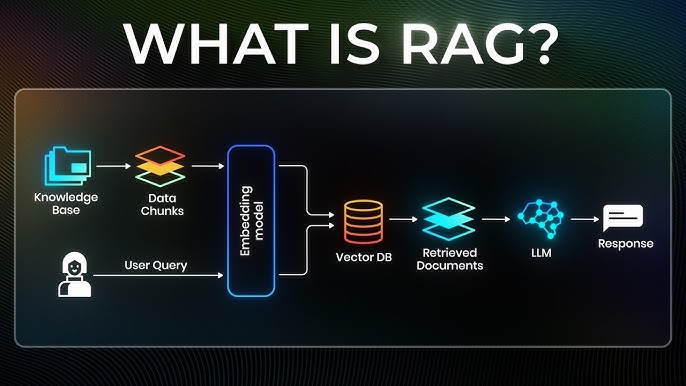
A production RAG pipeline consists of two main phases: Ingestion (offline prep) and Retrieval & Generation (online runtime execution).
Let’s break down the component layers.
Phase A: The Ingestion Pipeline (Data Prep)
Before we can query our custom data, we have to prepare it for machine search.
- Document Loading: We read unstructured text data from sources like PDFs, Markdown files, Word documents, or API feeds.
- Chunking: LLMs have context window limits. If you feed an entire 300-page manual into an embedding model, the mathematical representations get watered down. We break the text into smaller, overlapping segments (e.g., chunks of 500 characters with a 50-character overlap).
- Vector Embeddings: This is the magic step. We pass each text chunk through an embedding model (like text-embedding-004). The model converts the human text into an array of floating-point numbers (often 768 or 1536 dimensions). This vector represents the semantic meaning of the text. Words with similar meanings (like “dog” and “puppy”) will sit close together in this multi-dimensional space, even if they don’t share spelling.
- Vector Storage: We store these chunks and their corresponding mathematical vectors in a specialized database (like Pinecone, Chroma, pgvector, or even MongoDB Atlas Vector Search).
Phase B: The Retrieval & Generation Pipeline (Runtime)
When a user hits your Express API endpoint:
- User Query Vectorization: We take the incoming user question (e.g., “What is our refund policy for electronics?”) and convert it into a vector using the same embedding model we used during ingestion.
- Vector Similarity Search: We query our vector database using the query vector. The database performs mathematical calculations (typically Cosine Similarity) to find the top $K$ text chunks whose vectors are closest to our query vector.
- Prompt Augmentation: We format the retrieved text chunks into a system prompt. For example:
You are a helpful customer support assistant.
Use the following retrieved context to answer the user's question.
If the answer cannot be found in the context, say "I don't know."

[CONTEXT]:
- Chunk 1: "Refunds on electronics must be processed within 14 days of purchase."
- Chunk 2: "Clothing items can be returned within 30 days."

[USER QUESTION]:
What is our refund policy for electronics?
LLM Generation: The LLM processes the structured prompt and outputs a clean, factual response.
3. Hands-On: Building a RAG API in Node.js
Let’s translate this conceptual theory into real Node.js code.
To keep this tutorial completely accessible and independent of external database setups, we will build an in-memory vector store using basic Cosine Similarity math. This will demonstrate the exact underlying mechanics of vector databases without requiring you to sign up for cloud services.
Project Setup
Initialize a new Node.js project and install the Google Generative AI SDK, Express, and Dotenv:
mkdir js-rag-demo
cd js-rag-demo
npm init -y
npm install express @google/generative-ai dotenv
Create a .env file in the root directory and add your API key:
GEMINI_API_KEY=your_actual_api_key_here
PORT=3000
The Code Implementation
Now, let’s write our Express server. Create server.js:
import express from 'express';
import dotenv from 'dotenv';
import { GoogleGenAI } from '@google/generative-ai';

dotenv.config();

const app = express();
app.use(express.json());

// Initialize Google Gemini SDK
const ai = new GoogleGenAI({ apiKey: process.env.GEMINI_API_KEY });

// 1. Our Custom Knowledge Base (Simulating loaded documents)
const KNOWLEDGE_BASE = [
  "Our refund policy allows returns on electronics within 14 days of purchase with a valid receipt.",
  "Clothing items can be returned or exchanged within 30 days of purchase, provided the tags are attached.",
  "Customized or personalized items are final sale and cannot be returned under any circumstances.",
  "All returns require a government-issued photo ID for validation and processing.",
  "Refunds are credited back to the original form of payment, taking 3-5 business days to clear.",
  "Standard shipping takes 3 to 5 business days. Expedited shipping delivers packages within 1 to 2 business days."
];

// In-memory cache to store our calculated document embeddings
let documentEmbeddingsCache = [];

// Helper Math Function: Calculate Dot Product of two vectors
function dotProduct(vecA, vecB) {
  return vecA.reduce((sum, val, idx) => sum + val * vecB[idx], 0);
}

// Helper Math Function: Calculate Vector Magnitude
function magnitude(vec) {
  return Math.sqrt(vec.reduce((sum, val) => sum + val * val, 0));
}

// Calculate Cosine Similarity between two vector arrays
function cosineSimilarity(vecA, vecB) {
  return dotProduct(vecA, vecB) / (magnitude(vecA) * magnitude(vecB));
}

// Generate Embeddings using Gemini's text-embedding-004 model
async function getEmbedding(text) {
  try {
    const response = await ai.models.embedContent({
      model: 'text-embedding-004',
      contents: [{ parts: [{ text }] }]
    });
    return response.embedding.values;
  } catch (error) {
    console.error("Embedding generation failed:", error);
    throw error;
  }
}

// Ingest and embed our knowledge base on server startup
async function initializeKnowledgeBase() {
  console.log("Generating vector embeddings for knowledge base...");
  for (const text of KNOWLEDGE_BASE) {
    const vector = await getEmbedding(text);
    documentEmbeddingsCache.push({ text, vector });
  }
  console.log("Knowledge base successfully vectorized.");
}

// The core RAG Retrieval API route
app.post('/api/chat', async (req, res) => {
  const { question } = req.body;

  if (!question) {
    return res.status(400).json({ error: "Missing 'question' in request body." });
  }

  try {
    // Step 1: Vectorize the incoming user question
    const queryVector = await getEmbedding(question);

    // Step 2: Query our Vector Store (find top matches using Cosine Similarity)
    const matches = documentEmbeddingsCache.map(doc => {
      const similarity = cosineSimilarity(queryVector, doc.vector);
      return { text: doc.text, similarity };
    });

    // Sort matches by highest similarity score and grab top 2 context chunks
    matches.sort((a, b) => b.similarity - a.similarity);
    const topContextChunks = matches.slice(0, 2);

    console.log("\n--- Retrieval Results ---");
    topContextChunks.forEach((match, i) => {
      console.log(`Match #${i + 1} (Score: ${match.similarity.toFixed(4)}): "${match.text}"`);
    });

    // Assemble the retrieved texts into one block
    const retrievedContext = topContextChunks.map(m => `- ${m.text}`).join('\n');

    // Step 3: Augment the Prompt
    const systemPrompt = `
You are a helpful customer support assistant.
Answer the user's question accurately using ONLY the provided context below.
If the answer cannot be confidently derived from the context, respond with "I'm sorry, I don't have access to that information in our records."

[CONTEXT]:
${retrievedContext}

[USER QUESTION]:
${question}
`;

    // Step 4: Generate response from LLM using the augmented prompt
    const response = await ai.models.generateContent({
      model: 'gemini-1.5-flash',
      contents: [{ role: 'user', parts: [{ text: systemPrompt }] }]
    });

    // Send the final result back to client
    return res.json({
      answer: response.text,
      contextUsed: topContextChunks.map(m => m.text)
    });

  } catch (error) {
    console.error("API error:", error);
    return res.status(500).json({ error: "Internal server error occurred." });
  }
});

// Start the server only after knowledge base has been embedded
const PORT = process.env.PORT || 3000;
app.listen(PORT, async () => {
  await initializeKnowledgeBase();
  console.log(`RAG API Server running on port ${PORT}`);
});
4. Testing Your Pipeline
Once you run the server (node server.js or using ES module support), you can test the endpoint using curl or Postman.
Test Query #1: Asking about electronics returns (Should succeed)
curl -X POST http://localhost:3000/api/chat \
  -H "Content-Type: application/json" \
  -d '{"question": "How long do I have to return a computer?"}'
What happens behind the scenes:
- The server generates an embedding vector for the question.
- It calculates similarity scores against all sentences.
- The sentence “Our refund policy allows returns on electronics within 14 days of purchase…” registers a very high cosine similarity score (because “computer” is semantically linked to “electronics”).
- The system injects that sentence as context, and the LLM responds: “You have 14 days to return a computer, provided you have a valid receipt.”
Test Query #2: Asking about dog food (Should fail gracefully)
curl -X POST http://localhost:3000/api/chat \
  -H "Content-Type: application/json" \
  -d '{"question": "Do you sell premium dog food?"}'
What happens behind the scenes:
- The server generates the query embedding.
- The highest similarity score is very low because nothing in the knowledge base relates to pets or food.
- The context injected doesn’t contain the answer.
- Because of our strict prompt instructions, the LLM safely responds: “I’m sorry, I don’t have access to that information in our records.”—preventing a hallucination.
5. Moving Past Basic RAG: Production Challenges
While our in-memory Javascript script works great for a demo, production pipelines encounter real scaling and accuracy challenges that you’ll need to solve:
1. Vector Search Scale
Calculating cosine similarity across arrays manually in JS memory blocks the Node event loop if you scale to millions of documents. In production, offload this to dedicated vector engines:
- MongoDB Atlas Vector Search: Excellent for MERN developers because you don’t need a new database; you just write
$vectorSearchstages in your existing aggregation pipelines. - pgvector: If you run PostgreSQL.
- Pinecone / Qdrant: Cloud-native vector engines built specifically for high-speed similarity search.
2. Semantic Search vs. Keyword Search (Hybrid Search)
If a user searches for an exact product serial number like “AB-9928”, vector embeddings can sometimes struggle. They prioritize broad conceptual meanings rather than exact character matches. Production RAG systems use Hybrid Search: they run a vector search and a traditional keyword search (like BM25), merging the results together.
3. Re-ranking
After retrieving the top 10 documents, you pass them through a specialized Re-ranker model (like Cohere ReRank). The re-ranker evaluates the exact relevance of each document to the question, pruning out irrelevant chunks before you pay for LLM context tokens.
Conclusion
Building RAG pipelines shifts our role as developers. Instead of writing static logic or leaving LLMs to generate answers unchecked, we act as data gatekeepers—curating what context gets parsed, structuring prompt templates, and managing the backend flow.
If you’re a MERN developer looking to transition into AI, mastering vectors and retrieval architectures is the absolute best place to start.
Let me know if you run into any issues setting up the Node script, or if you want a future post detailing how to wire this directly into MongoDB Atlas Vector Search!

25 year old AI & MERN Stack Developer based in Mohali, Punjab, India, with a strong interest in system design, Artificial Intelligence, Large Language Models (LLMs), and scalable software architecture. Passionate about building innovative, intelligent, and high-performance applications.